My toolkit for 2025
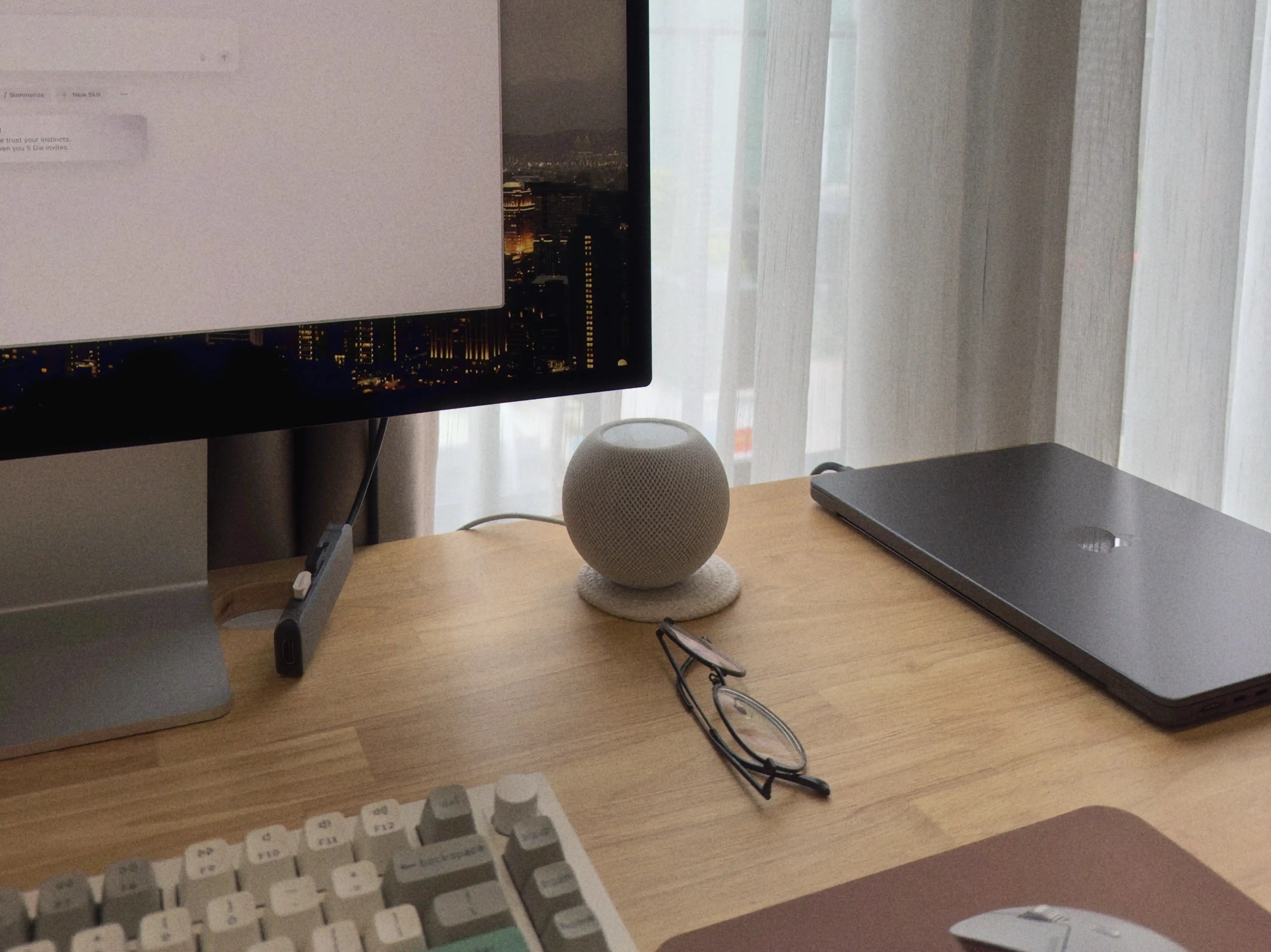
Here’s my 2025 toolkit for work and life. I’ve been doing these annual snapshots since 2019 (2023 and 2024 posts if you wanna follow), and this year I’ve had some bigger shifts than anticipated.
Hardware #
On my desk #
MacBook Pro M4 Pro 14-in at home — I recently upgraded to the M4 in the gorgeous Space Black and gave my Silver M3 MacBook Pro to my fiancée, whose M1 was starting to get a bit too slow for all the tabs and apps she had to keep open at work.
MacBook Pro M3 Pro 16-in at the office — Work finally upgraded my laptop from an Intel MacBook Pro back in October 2024. Before I could ask for the Silver color to match my Silver M3 14-in at home, they had already put one in Space Black on my desk, and immediately I didn’t want to go back to Silver.
Apple Studio Display — I love working and browsing on this beautiful monitor. I’ve had it for a little over two years and it’s a joy to use, even just to look at. The built-in speakers sound surprisingly great. Well worth the hefty price tag and probably one of my favorite purchases.
Rapoo MT760 Mini — After half a decade with the Logitech MX Master mouse, a month ago I downgraded to a much more affordable alternative that fulfills 90% of my needs. The main reason for the switch is that I’ve gone through a couple of MX Master 3s because after a year or so of heavy use as a designer, the left click just stops working. It turns into Russian roulette where one moment it works and then it doesn’t. Turns out this is a common issue with the MX Master’s switches.
Keychron Q1 Max at home and Keychron V1 Max at the office — It’s been a journey to arrive at these two, and kind of a full-circle moment too. I wrote about them and my past keyboards in My mechanical keyboard journey.
Magic Trackpad — This serves a very specific use case for me: zooming and panning when I’m working in Figma (I mostly use my laptop in clamshell mode). That’s pretty much all I use it for. But it does that so well that I finally decided to get a second one for my home setup instead of carrying one back and forth from the office.
Bose QuietComfort Ultra — A couple of years in, these are still the best headphones I’ve ever owned. Great sound quality and amazing comfort, true to the name.
HomePod mini — I now have two of these which I use as a stereo setup for my home office.
On the go #
iPhone 17 — I was content with my 15 Pro and didn’t intend to upgrade until at least the iPhone 19. Then the iPhone 17 came out and after seeing the specs, I felt I could actually go back to a base model after using a Pro phone since 2019. I’ve had it for just a few days but so far I’m really happy with it. Some might see it as a downgrade, but to me it’s an upgrade because I want a tool that’s more aligned with my actual needs and preferences at a lower cost. I didn’t really use the Pro features like Apple ProRAW or the zoom lens. Also, I have to admit I was getting bored of the natural titanium finish. A seemingly small cosmetic reason, but I’d argue that since your phone is the device you use the most, you might as well want to feel good and inspired using it.
iPad mini + Apple Pencil — The best combo I’ve purchased and the biggest game changer for me. It helped me change my reading habit and crush my book goal in 2024, and again in 2025 just a couple of days ago. I upgraded from the 6th gen to the 7th gen this year primarily for larger storage, otherwise the improvements on the 7th gen seem rather marginal.
Audio-Technica ATH-CKD3C — These are actually my fiancée’s earphones, and I’m borrowing them indefinitely. They are honestly fantastic, from sound quality, audio, to comfort. I forgot how solid wired earphones sound. My AirPods Pro can’t compare. I’ve been using them on my commute to listen to audiobooks, during workouts, and for music when I’m not using the Bose or speakers.
AirPods Pro 2 — I use these mainly for sit-in meetings like all-hands or customer meetings, which aren’t often. I haven’t cared much about noise cancelling, so they’ve mostly been sitting in my backpack. My biggest issue is I’ve tried all the included earpiece sizes and none of them are truly comfortable. I used these while running, but after ten minutes or so they tend to fall out of my ears and that became distracting. I’m curious if the new 3rd gen addresses the comfort issue, or if I should just invest in a pair more geared for sports.
Software #
Productivity #
Dia — This browser feels like a stripped-down version of Arc (and a cleaner Chrome), which a lot of people don’t like, but I was surprised by how much I enjoy it. It has only the essentials, and I don’t care to use the AI features at all.
Raycast — The new Spotlight in macOS 26 looks great, but I still think it’s years behind Raycast.
Rectangle Pro — One reason I paid for this app instead of other window managers like Magnet is the custom size and position feature. I usually test my designs on different viewport sizes, sometimes I like to write at a certain viewport width, and I also take product screenshots at specific window sizes. Having shortcuts for all of that is handy. Raycast has this too, but it requires a subscription.
Raindrop — All my bookmarks now live here since I moved to Dia from Arc and needed a dedicated place for them. I use the Raindrop extension in Raycast to quickly access and add bookmarks, which is super efficient.
Dashlane — My password manager since 2021. It comes with a complementary VPN, which is convenient.
ChatGPT — My primary AI tool. I use it for searching, researching, brainstorming, and proofreading.
Claude — I prefer Claude’s outputs when I need more depth, mostly for coding and writing.
Design & development #
v0 — My primary UX prototyping tool. I rarely start with Figma first these days.
CleanShot X — The best screenshot app on the market, in my opinion. I use the built-in annotation tool and OCR every day.
PixelSnap 2 — I don’t use this as often anymore, but when I need it, it works well. It integrates nicely with CleanShot.
Pika — A clean and minimal color picker with a built-in accessibility check. It’s a cheaper alternative to ColorSlurp, which I had used for a while until I realized most of its features were locked behind an expensive subscription.
Screen Studio — A beautiful screen recording and video editing tool that I wish I had more use for. I bought a license a year ago out of FOMO but have exported only a few videos. CleanShot X already covers 99% of what I need.
Sublime Text — My code editor of choice now that I’m more comfortable with Terminal, where I use Node.js http-server to test locally. This essentially replaces the Live Preview feature from Brackets that I once couldn’t live without.
Writing & organization #
Obsidian — Where I keep most of my personal notes and do all my writing for this blog. I don’t keep everything in Obsidian or any one app, and here’s why.
Apple Journal — For thoughts, fragments, feelings, and moments I want to log and revisit. I love that it’s on macOS and iPadOS now so I’m no longer confined to a tiny screen.
Thoughts — I use this app to store quotes from newsletters, books, and articles. I keep it as a widget on my phone to see quotes as reminders.
Notion — I have a database with the calendar view for my work log items to track what I do in a week, month, quarter, and so on. I also have a separate database for my personal log where I track life events with different categories tied to the goals I set every year.
Spark Mail — For my personal inbox.
Notion Mail — For my work inbox. I recently switched from Apple Mail after encountering syncing issues. (As Notion gets bigger, it’s starting to feel like corporate software to me. That’s why I’m wanting to steer away from it, at least for personal use.)
Travel & finance #
Flighty — I finally started using this app earlier this year to track my flights. It’s so well designed and delightful to use, and it makes me want to fly more often.
Dime — I use it for my monthly budgeting while I still use Wallet to track all my accounts.
Numi — I use it with Dime and Wallet, mainly for ad hoc expenses and planning travel budgets where I use several different currencies.
Media & reading #
!Camera — I’ve been using it almost as a replacement for the default camera app on my phone. I was using Zerocam heavily before, but it seems to have switched to paid-only and I didn’t want another subscription. Plus, !Camera gives me more control and its free tier is enough for me.
mood.camera — For when I feel like taking artsy photos.
feeeed — I used NetNewsWire and Reeder before, both great apps, but I quite enjoy not having an inbox experience for my RSS feed. I don’t need everything read, I can just scroll and pick whatever catches my interest.
Apple Books — The best e-book reading app if you’re in the Apple ecosystem.
Apple Music — Still not as strong as Spotify’s recommendation algorithm, but its UI and UX have improved a lot (and lossless audio is superb) while Spotify’s design is starting to feel too busy to me.
Utilities & system tools #
BatFi — A native battery optimization app with a clean design. Probably the best investment you can make for your Mac’s battery lifespan and overall longevity.
LookAway — One of my favorite purchases in the last couple of years. The app keeps getting new features, including an iOS version.
Dropover — I don’t move files around often, but this makes it easy and even fun when I do.
Clop — A powerful all-in-one image and file optimizer.
BetterDisplay — I used MonitorControl for a while, but this app’s free tier has a few extra features I want to test.
MiddleClick — A simple app that does one thing really well. When I read or browse blogs, I open lots of links, and this saves time.
Karabiner-Elements — This replaced Command X for me and keeps shortcuts consistent across my different keyboards.
Folder Preview — Useful for quickly peeking inside a zip file or a folder.
CleanMyKeyboard — Another free, simple app that does one thing really well. I use it maybe once a week.
That’s it for this year’s stack. Some of these choices will probably change again soon, and I think that’s part of the fun — seeing what tools come and go, and how my habits and systems evolve.